
BeautifulSoup vs Playwright vs Scrapy: Which Should You Use?
Picking the right scraping tool saves you time. The wrong one means you're fighting your tools instead of extracting data. Here's how the three most popular Python scraping tools compare.
The Short Answer
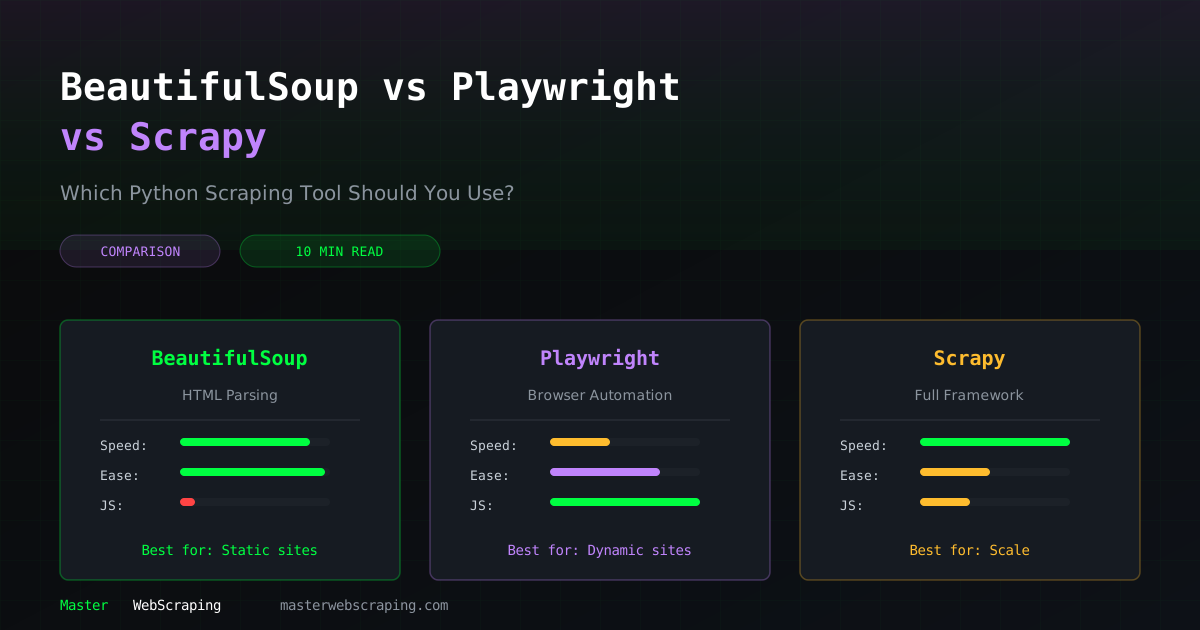
- •BeautifulSoup: use for simple, static websites. Fastest to learn, fastest to run.
- •Playwright: use when the site needs JavaScript. Handles SPAs, login flows, dynamic content.
- •Scrapy: use when you need to scrape at scale. Built for crawling thousands of pages with retry, throttling, and pipelines built in.
BeautifulSoup + Requests
BeautifulSoup is a parsing library. It takes HTML and lets you search through it with CSS selectors or methods like find() and find_all(). Pair it with requests for fetching pages and you have the simplest scraping stack.
When to Use It
- •The website works without JavaScript (view source shows the data)
- •You're scraping a small number of pages (under 1,000)
- •You want the fastest development time
- •You're learning web scraping for the first time
Example
import requests
from bs4 import BeautifulSoup
response = requests.get("https://example.com/products")
soup = BeautifulSoup(response.text, "lxml")
for product in soup.select(".product-card"):
    name = product.select_one(".name").text
    price = product.select_one(".price").text
    print(f"{name}: {price}")
Pros
- •Extremely simple API — learn it in an hour
- •Fast execution (no browser overhead)
- •Low memory usage
- •Great for quick scripts and prototypes
Cons
- •Cannot execute JavaScript
- •No built-in request handling (retries, throttling, cookies)
- •Not designed for large crawls
- •You manage everything yourself (sessions, headers, delays)
Performance
- •~50-100 pages/second (with async: 500+)
- •Memory: ~50 MB for typical scripts
Playwright
Playwright is a browser automation library from Microsoft. It controls a real Chromium, Firefox, or WebKit browser, so it can do anything a human can: render JavaScript, click buttons, fill forms, scroll, take screenshots.
When to Use It
- •The site is a Single Page Application (React, Vue, Angular)
- •Data loads via JavaScript after the initial page load
- •You need to interact with the page (login, click "Load More", fill search forms)
- •You need to bypass JavaScript-based anti-bot challenges
Example
from playwright.sync_api import sync_playwright
with sync_playwright() as p:
    browser = p.chromium.launch(headless=True)
    page = browser.new_page()
page.goto("https://example.com/spa-products")
    page.wait_for_selector(".product-card")
products = page.query_selector_all(".product-card")
    for product in products:
        name = product.query_selector(".name").inner_text()
        price = product.query_selector(".price").inner_text()
        print(f"{name}: {price}")
browser.close()
Pros
- •Handles JavaScript-heavy sites
- •Can interact with the page like a real user
- •Built-in wait mechanisms (wait for elements, network idle)
- •Takes screenshots and PDFs
- •Helps bypass some anti-bot systems
Cons
- •Slow compared to HTTP-based scraping (browser overhead)
- •High memory usage (each browser instance uses 100-300 MB)
- •More complex setup
- •Harder to scale beyond a few concurrent browsers
Performance
- •~2-10 pages/second (depending on page complexity)
- •Memory: ~300 MB per browser instance
Scrapy
Scrapy is a full web crawling framework. BeautifulSoup is a library you drop into a script. Scrapy is an opinionated framework with its own project structure, middleware system, and data pipeline.
When to Use It
- •You're scraping 10,000+ pages
- •You need built-in retry logic, rate limiting, and duplicate detection
- •You want structured data pipelines (scrape → clean → store → export)
- •You're building a scraper that needs to run on a schedule in production
Example
import scrapy
class ProductSpider(scrapy.Spider):
    name = "products"
    start_urls = ["https://example.com/products"]
def parse(self, response):
        for product in response.css(".product-card"):
            yield {
                "name": product.css(".name::text").get(),
                "price": product.css(".price::text").get(),
            }
next_page = response.css("a.next::attr(href)").get()
        if next_page:
            yield response.follow(next_page, self.parse)
Pros
- •Built for scale — handles thousands of concurrent requests
- •Built-in retry, throttle, and duplicate filtering
- •Data pipelines for processing and storing data
- •Middleware system for proxies, headers, and custom logic
- •Export to CSV, JSON, databases out of the box
- •Excellent logging and stats
Cons
- •Steep learning curve — Scrapy has its own way of doing things
- •Cannot execute JavaScript natively (needs scrapy-playwright plugin)
- •Overkill for small projects
- •More boilerplate for simple tasks
Performance
- •~100-1,000 pages/second (async, concurrent requests)
- •Memory: ~100-200 MB (efficient for large crawls)
Head-to-Head Comparison
| Feature | BeautifulSoup | Playwright | Scrapy |
|---|---|---|---|
| Learning curve | Easy | Medium | Hard |
| JavaScript support | No | Yes | Via plugin |
| Speed | Fast | Slow | Very fast |
| Memory usage | Low | High | Medium |
| Built-in retries | No | No | Yes |
| Data pipelines | No | No | Yes |
| Anti-bot bypass | Limited | Good | Via middleware |
| Best for scale | No | No | Yes |
| Async support | Via aiohttp | Built-in | Built-in |
Can You Combine Them?
Yes, and you often should:
- •BeautifulSoup + Scrapy: use Scrapy's crawling engine with BeautifulSoup for parsing (some people prefer BS4's API over Scrapy's selectors)
- •Playwright + BeautifulSoup: use Playwright to render the page, then pass
page.content()to BeautifulSoup for parsing - •Scrapy + Playwright: the
scrapy-playwrightplugin lets Scrapy use Playwright for JavaScript-heavy pages while keeping Scrapy's infrastructure for everything else
My Recommendation
Start with BeautifulSoup. It teaches you the fundamentals: HTTP requests, HTML parsing, CSS selectors. Those concepts transfer to every other tool.
Add Playwright when you need it. You'll know when, because the HTML source won't contain the data you see in the browser.
Move to Scrapy when you're scraping more than a few thousand pages, or when you need retry logic and data pipelines. It saves you from building that infrastructure yourself.
The Master Web Scraping course teaches all three, starting with BeautifulSoup and progressing to Playwright browser automation and production-scale Scrapy spiders.